AI Upskilling for Product Designers: The E-P-I-A-S × SAE Framework
I made this system after being asked for one. And I know that by the time I publish it, it's not going to be perfectly correct. That said, something is better than nothing right now — so here it is.
I'm presenting this as part of the Design in Tech Report 2026: From UX to AX at SXSW, but I wanted to open source it sooner rather than later. If you're a product designer trying to figure out where you stand with AI — or a design leader trying to upskill your team — I hope this gives you a useful frame.
This will be subject to more than a few changes this year. I know that for sure ;-). —JM
How to Use This
This framework has two axes. The first is "E-P-I-A-S" which is a maturity progression that describes how deeply you've internalized a skill, from Explorer (trying things out) to Steward (setting standards for others).
| ❶ E: Explorer | ❷ P: Practitioner | ❸ I: Integrator | ❹ A: Architect | ❺ S: Steward |
|---|---|---|---|---|
| Trying things; learning basics | Building consistent habits | Making it part of workflow | Building systems others use | Setting standards; teaching others |
You naturally progress ❶ E → ❷ P → ❸ I → ❹ A → ❺ S.
The second is the SAE Level which is adapted from the automotive industry's levels of driving automation — which describes how much of your design workflow AI is responsible for.
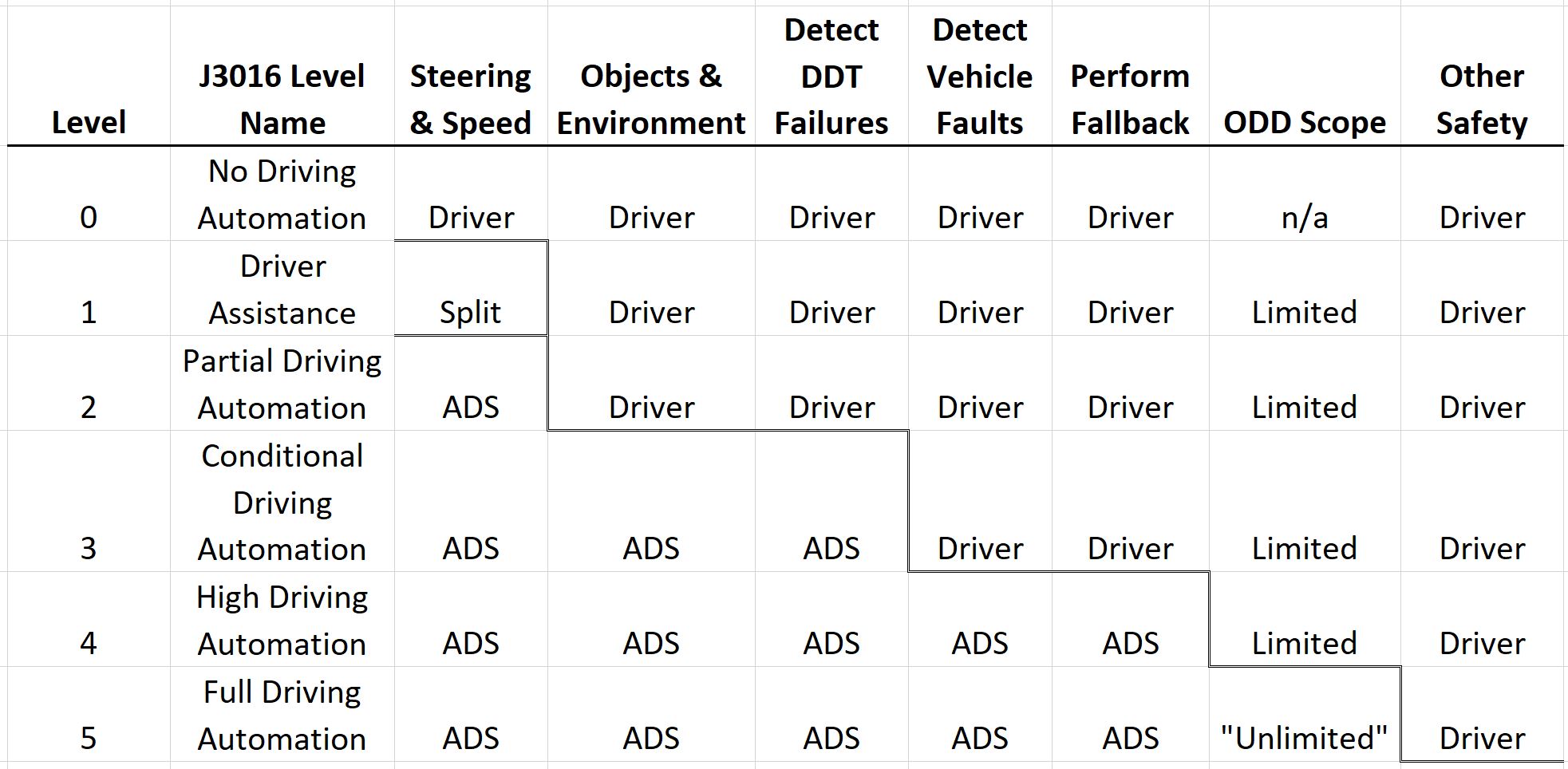
via CMU
Together they form a matrix. Here's how to navigate it:
- Start by finding your SAE Level. Use the self-assessment checklist to identify where your current AI usage falls — from L0 (fully manual) to L4 (mostly automated). Be honest. Most product designers in early 2026 are somewhere between L1 and L2.
- Then find your E-P-I-A-S maturity within that level. Are you just experimenting (Explorer)? Running consistent workflows (Practitioner)? Building systems others rely on (Architect)? Your maturity at your current level matters more than which level you're at.
- Use the matrix to plan your growth. You can grow in two directions — deeper (E→S within your current SAE level) or wider (moving up an SAE level). Both are valuable. Going deeper at L1 before jumping to L3 is often the smarter path, because the judgment and habits you build carry forward.
BONUS: If you're a design leader, use this to map your team. You'll likely find people spread across multiple SAE levels and maturity stages. That's normal and healthy. The framework helps you have concrete conversations about where people are and where they want to go — without it becoming a race to the highest SAE number.
One important thing to internalize: an S-Steward at SAE L1 (someone who's built organizational standards for ChatGPT usage) is more mature and more valuable than an E-Explorer at SAE L4 (someone fumbling with advanced toolchains). Depth of judgment beats breadth of tooling every time.
Step 1: Find your SAE level
SAE Levels of Driving Automation (SAEJ3016 est 2014)
Let's take learnings for how AI's progression is being tracked best: the automotive industry. The official SAE (Society of Automotive Engineers) levels of driving automation describe who is responsible for driving — the human or the vehicle — across perception, decision-making, and control.
| SAE Level | Name | Who Drives / Is Responsible | Plain-English Explanation | Everyday Examples |
|---|---|---|---|---|
| SAE L0 <br>🚗💨 | No Automation | Human does everything | No driving automation; the system may warn but never controls the car | Basic alerts, lane-departure warnings |
| SAE L1 <br>🚗➕ | Driver Assistance | Human drives; system assists one function | The car can help either steering or speed, but not both at once | Adaptive cruise control, lane keeping assist |
| SAE L2 <br>🚗🧠 | Partial Automation | Human supervises; system controls steering and speed | The car can steer and control speed together, but you must watch and intervene | Tesla Autopilot, GM Super Cruise (hands-on variants) |
| SAE L3 <br>🚗😴 | Conditional Automation | System drives within conditions; human is fallback | The car drives itself sometimes, but may ask you to take over | Traffic-jam pilots, limited highway autonomy |
| SAE L4 <br>🚕🤖 | High Automation | System drives; no human needed within defined areas | The car drives itself in specific places or conditions; no driver attention required | Robotaxis in geofenced cities |
| SAE L5 <br>🚗✨ | Full Automation | System drives everywhere | No steering wheel required; the car can drive anywhere a human can | Fully autonomous vehicles (not yet real) |
Key clarifications (why confusion happens):
- L2 ≠ self-driving — the human is still legally responsible.
- The big legal shift happens between L2 and L3 (who must pay attention).
- L4 works today, but only in constrained environments.
- L5 is theoretical — it does not currently exist in production.
Self-Assess Your Current SAE Level
| SAE Level | AI Usage Examples | AI Tooling Examples (Not Exhaustive) |
|---|---|---|
| SAE L0 <br>Manual <br>🚗💨 | “I do my design work without AI; I'm open to using the latest tool, but in general I prefer doing things as manually as possible.” | None |
| SAE L1 <br>AI-Assisted <br>🚗➕ | “I use {tools} to generate ideas, copy, or visuals, but I direct each step and manually verify and refine everything.” | ChatGPT, Midjourney, Figma Make, Krea, Adobe Firefly, Canva, DALL-E, Replicate, … |
| SAE L2 <br>Partially Automated <br>🚗🧠 | “I use {app-builders} to generate bounded chunks (screens, components, small flows) from clear instructions, then I manually integrate and QA the results.” | Lovable, Bolt.new, Framer, Vercel v0, Replit, GitHub Spark, … |
| SAE L3 <br>Guided Automation <br>🚗😴 | “In {my IDE}, I run orchestrated, multi-step workflows with basic context engineering, using subagents/skills/MCP tools to generate large pieces of work, with human-led QA and eval checkpoints.” | VS Code (w/ GitHub Copilot), Cursor, OpenAI API/Tools, Anthropic Claude API, Microsoft Foundry, Gemini AI Studio, LangChain, n8n, … |
| SAE L4 <br>Mostly Automated <br>🚕🤖 | “In {my IDE/ADE/CLI}, I operate advanced context, tuned harnesses, and eval suites, using subagents/skills/MCP tools to generate, refine, and QA features end-to-end, with humans handling exceptions rather than execution.” | Claude Code CLI, Conductor, GitHub Copilot CLI, LangSmith, LangGraph, Braintrust, Weights & Biases, HuggingFace, Unsloth, … |
| SAE L5 <br>Full Autonomy <br>🚗✨ | “AI runs most of the workflow by default and self-corrects; I set the goals, constraints, quality bar, and approval gates, then review outcomes and exceptions.” | None |
Note that SAE L2, L3, L4 are all getting blurrier with each other every day as the various tools/systems are vertically consuming each other's capabilities. SAE L5 is aspirational and hasn't happened, yet.
Step 2: Find Your E-P-I-A-S Maturity Stage At Your SAE Level
We start with a generic maturity progression for a learner. HT Monty Hammontree for his advice on this instrument that I changed a teense to create the catchy acronym E-P-I-A-S.
Learner Maturity Stages As E-P-I-A-S
| ❶ E: Explorer | ❷ P: Practitioner | ❸ I: Integrator | ❹ A: Architect | ❺ S: Steward |
|---|---|---|---|---|
| Trying things; learning basics | Building consistent habits | Making it part of workflow | Building systems others use | Setting standards; teaching others |
You naturally progress ❶ E → ❷ P → ❸ I → ❹ A → ❺ S. Let's apply this to the conventional non-AI product designer's progression in skillsets.
Non-AI Product Designer Skillset Progression
| ❶ E: Explorer | ❷ P: Practitioner | ❸ I: Integrator | ❹ A: Architect | ❺ S: Steward |
|---|---|---|---|---|
| Learning design fundamentals; quality varies, needs guidance | Consistent design process; repeatable methods and quality checks | Design embedded end-to-end in product development; clear rationale and validation | Building design systems, processes, and frameworks that others adopt | Setting organizational design standards; mentoring designers; maintaining shared systems |
This bears a parallel to the career progression "ladder" in product design today.
Conventional Product Design Career Progression
| ❶ E: Explorer | ❷ P: Practitioner | ❸ I: Integrator | ❹ A: Architect | ❺ S: Steward |
|---|---|---|---|---|
| Junior Designer | Designer/Mid-level | Senior Designer | Staff/Principal Designer | Director/Design Lead |
Keep in mind that a director or lead can still behave like an "Explorer" by having a beginner's mind. Right? They truly need to have that right now in the age of AI.
Do you get the idea of E-P-I-A-S? Awesome! Now locate your SAE level of operating in the AI era, and situate the stage you might be in right now.
Step 3: Use Your Current E-P-I-A-S Stage Within An SAE Level To Plot A Path To The Next Stage
The goal of AI as embedded in product design work mirrors the evolution of the automotive industry and its levels of automation. SAE L0 is simply "manual" mode for product designers. The goal isn't necessarily to move up automation levels as it depends upon the kind of work you're tasked to do. That said, I think it's always useful to see what kind of work is done at "higher" levels up the food chain.
E-P-I-A-S at Each SAE Level
SAE L0: 🚗💨 Manual
Human-only execution
You do the work. Tools don’t decide or generate.
| E: <br>Explorer <br>❶→ | P: <br>Practitioner <br>❷→ | I: <br>Integrator <br>❸→ | A: <br>Architect <br>❹→ | S: <br>Steward <br>→❺ |
|---|---|---|---|---|
| Exploring craft fundamentals; learning manual techniques with inconsistent results | Consistent manual practice with developed habits and repeatable techniques | Manual workflow fully integrated with validation steps, traceability, and clear decision documentation | Built reusable manual systems, templates, and processes that others on team adopt | Set organizational standards for craft quality; mentor others in manual techniques; maintain shared design systems |
SAE L1: 🚗➕ AI-Assisted
AI suggests; human decides
AI helps you think and draft, but never owns outcomes.
| E: <br>Explorer <br>❶→ | P: <br>Practitioner <br>❷→ | I: <br>Integrator <br>❸→ | A: <br>Architect <br>❹→ | S: <br>Steward <br>→❺ |
|---|---|---|---|---|
| Trying ChatGPT, Midjourney, Firefly for ideas or drafts; outputs are hit-or-miss and heavily rewritten | Using AI daily with saved prompts; consistent structure, tone, and basic quality checks before use | AI embedded across a full task (research → ideation → draft → refine) with sources noted, decisions explained, and manual validation | Shared prompt libraries, review checklists, and example outputs teammates can reuse and trust | Team standards for AI-assisted work (what’s allowed, how it’s reviewed); mentors others on prompting and judgment; governs usage |
SAE L2: 🚗🧠 Partially Automated
AI builds bounded chunks; human integrates
AI produces usable pieces, but you assemble and verify.
| E: <br>Explorer <br>❶→ | P: <br>Practitioner <br>❷→ | I: <br>Integrator <br>❸→ | A: <br>Architect <br>❹→ | S: <br>Steward <br>→❺ |
|---|---|---|---|---|
| Trying app-builders (Bolt/Lovable/v0/Framer) to generate screens/components; lots of manual stitching and rework | Getting repeatable components from clear specs; using a simple “definition of done” checklist before integrating | Outputs fit a known integration pattern (tokens/layout/a11y); prompts + inputs are traceable from request → result → final | Reusable component/flow templates + prompt packs that teammates can run and get consistent results | Team norms for what to automate at L2 (safe chunks vs risky ones); mentors others on integration + QA; governs usage and review expectations |
SAE L3: 🚗😴 Guided Automation
IDE-centric, human-in-the-loop execution
If you close your laptop, the system stops.
| E: <br>Explorer <br>❶→ | P: <br>Practitioner <br>❷→ | I: <br>Integrator <br>❸→ | A: <br>Architect <br>❹→ | S: <br>Steward <br>→❺ |
|---|---|---|---|---|
| Moving work into an IDE (VS Code/Cursor); learning basic context rules; multi-step runs are inconsistent and fragile | Running reliable multi-step workflows inside the IDE with explicit checkpoints (plan → generate → review → revise); lightweight evals by default | Clear decision framing for IDE-run workflows: what AI executes, what humans approve, and when to intervene; failure modes documented | Shared IDE-invoked workflows: Skills/MCP tools, context libraries (brand, design system, constraints), and reusable eval templates teammates can run | Org standards for IDE-based AI work (safety, quality, traceability); mentorship on context engineering; maintains shared Skills/MCP used from IDEs |
Key L3 signal:
SAE L4: 🚕🤖 Mostly Automated
Harness-centric, system-run execution
Work completes while you’re asleep — and you trust the results unless alerted.
| E: <br>Explorer <br>❶→ | P: <br>Practitioner <br>❷→ | I: <br>Integrator <br>❸→ | A: <br>Architect <br>❹→ | S: <br>Steward <br>→❺ |
|---|---|---|---|---|
| Experimenting with autonomous harnesses and agent pipelines; results require heavy validation and manual debugging | Operating harnesses with repeatable execution patterns; evals, retries, and escalation paths are consistently applied | End-to-end workflows run autonomously; comprehensive eval suites validate outputs; exception classes and recovery paths documented | Built production-grade agent infrastructure others operate: self-improving harnesses, shared skill libraries, eval-driven pipelines | Governance for autonomous systems at scale; defines risk thresholds, approval gates, and accountability; maintains org-level eval and autonomy infrastructure |
SAE L5: 🚗✨ Fully Automated
_Science-fiction, might happen some day_
This is the AGI dream.
| E: <br>Explorer <br>❶→ | P: <br>Practitioner <br>❷→ | I: <br>Integrator <br>❸→ | A: <br>Architect <br>❹→ | S: <br>Steward <br>→❺ |
|---|---|---|---|---|
| Exploring goal-setting interfaces for autonomous AI; exception handling is unclear | Setting approval gates and quality bars consistently; routine review of autonomous outputs | Autonomous workflows validated with exception handling systems; clear escalation paths documented | Designed goal-setting and approval systems that others trust; reusable governance frameworks | Enterprise governance for fully autonomous AI; set approval frameworks; organizational AI risk and trust standards |
Congratulations!
Do you feel a little better now? I hope so! I spent three weekends working on this ... but also have spent the last few decades on this problem, too. I don't expect to fully solve it before I kick the bucket, but I'll keep on trying to improve this system!
This framework is part of the Design in Tech Report 2026. It will be presented at SXSW 2026. Feedback and contributions welcome.